解决方案
CSharp运行matlab库时报错libmwlapack: load error: mkl.dll.的解决方案MWMCR:EvaluateFunction error找不到指定模块
win11离线安装donet3.5的方法
Qt6离线安装方式
QFile无法打开文件明明文件已经存在却无法打开open failed路径或者卷标不正确奇葩问题
关于启用https访问Mrdoc网站cloudflare服务支持http和https同时访问
VS编译工程提示错误error C1083: 无法打开包括文件: “stddef.h”: No such file or directory该文件指向win10 kits安装windows SDK10具体方法
关于Matlab调用Python时出现的错误解决方案Python 命令需要支持的 Cpython 版本。请参阅 <a href="matlab:helpview([docroot'/matlab/helptargets.map’]
Docker构件镜像时 Sending build context to Docker daemon远远超过原镜像大小docker build超出大小原因
QEnum的正确使用方法QMetaEnum::fromType方式总是为空isValid总是为false的解决方案和方法通过键获取值通过值获取键Q_ENUM注册失败
关于静态库的使用的注意事项动态库改静态库的不同static library
windows上Qt编译源码open source building vs2022 qt5.15.17版本编译环境问题 环境配置编译QT依赖安装
Qt5.15.17源码编译的最终版windows下使用VisualStudio编译QtWebEngine组件遇到的问题及解决方案使用VS2019进行编译启用GPU硬件加速显卡OpenGL(最终版)
Qt在MainWindows上悬浮一个QWidget窗体,窗体内有四个按钮,保持QWidget在Mainwin的正中间并设置为透明背景黑色设置无效
windows脚本bat建立目录软链接 系统找不到指定的路径
rdkafka接收数据慢的解决方案发送完了却没有接收完的问题
Qt通过QSS样式将QToolButton下拉弹出菜单的提示按钮由右边让其底部居中显示
使用Qss设置背景图片的一些问题记录不生效,效率低,背景图片不能拉伸
CMakeList管理一个工程引用另外一个工程库该注意
CMakeList设置输出bin和lib目录
CMakeList中实现编译完成后自动拷贝指定文件到指定目录copy
QT工程中文出现乱码的解决方案编译后中文显示不正确显示乱码utf-8编码编译编码
windows下编译Minio cpp客户端编译过程
本文档使用 MrDoc 发布
-
+
首页
windows上Qt编译源码open source building vs2022 qt5.15.17版本编译环境问题 环境配置编译QT依赖安装
# 说明 由于项目需要,需要依赖qwebengine进行项目的集成开发,由于qt5官方能够提供安装的最终版本为qt5.15.2,能够下载安装使用,但是更高版本则不提供安装版,只有源码。且chorme内核版本与qt版本有绑定关系...为了显示3D地球网页版,决定还是要提高qt对应的chrome内核版本,由于qt6的开发与qt5的语法不太一致,第三方库的支持也没有那么完善,于是决定要编一套qt5的源码,并且项目需求可能涉及windows_x64,linux_x64,linux_arm64三个不同版本。 https://wiki.qt.io/QtWebEngine/ChromiumVersions 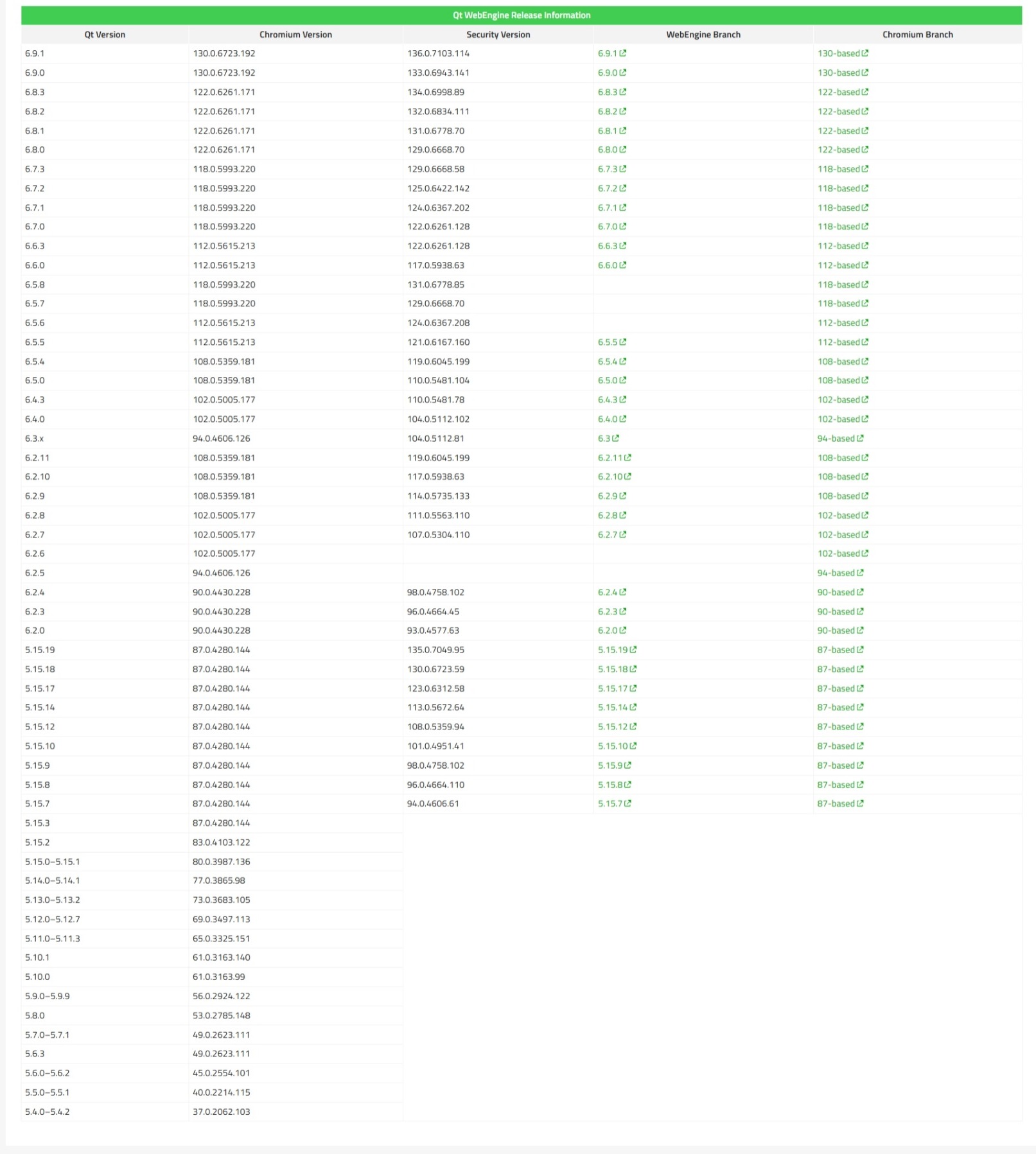 # 安装编译依赖环境 这一步挺复杂和麻烦,因为这一步要做的挺多的,说明又不是很清楚,需要自己不断出错重试,以及总结的... 1. ~~安装python3,至于是3.几,我这里安装的是[3.9.13]~~(https://www.python.org/downloads/ "3.9.13")[python3已证实不行][下载python2.7.18](https://www.python.org/downloads/release/python-2718/ "下载python2") 2. [安装node13](https://nodejs.cn/download/ "安装node13") 3. (可选)[安装gnu32win4.2.1](https://sourceforge.net/projects/gnuwin32/ "安装gnu32win4.2.1") 4. (可选 for openssl)[安装nasm2.16.01](https://www.nasm.us/pub/nasm/releasebuilds/ "安装nasm2.16.01") 5. [安装StrawberryPerl5.38.2](https://www.perl.org/ "安装StrawberryPerl5.38.2")(推荐)或者activePerl 6. (可选)[下载ninja1.13.0](https://github.com/ninja-build/ninja/releases/download/v1.13.0/ninja-win.zip "下载ninja1.13.0") 7. [下载jom1.1.3](https://github.com/qt-labs/jom/archive/refs/tags/v1.1.3.zip "下载jom1.1.3") 8. (可选)[下载win_flex_bison2.5.25](https://github.com/lexxmark/winflexbison/releases/download/v2.5.25/win_flex_bison-2.5.25.zip "下载win_flex_bison2.5.25") 9. [下载icu4c_69.1](https://github.com/unicode-org/icu/releases/download/release-69-1/icu4c-69_1-Win64-MSVC2019.zip "下载icu4c_69.1") 10. [下载clang100](https://download.qt.io/development_releases/prebuilt/libclang/libclang-release_100-based-windows-vs2019_64.7z "下载clang100") 11. [下载openssl1.1.1](https://github.com/kzalewski/openssl-1.1.1/archive/refs/tags/1.1.1zb_p3.zip "下载openssl1.1.1"),并编译 将上述下载的文件,都解压到QtDepends目录下,并设置环境变量 ==gnu32win可以不用安装,qt自带== ==win_flex_bison可以不用安装,qt自带== 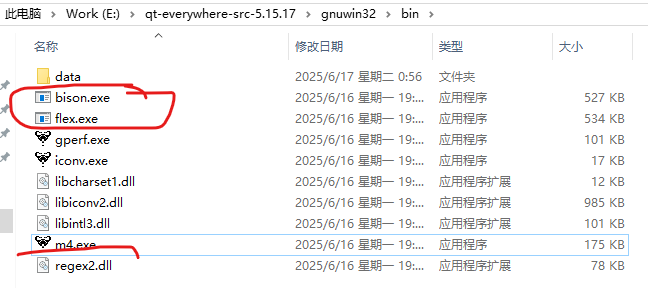 ==ninja可以不用安装,vs2022自带== 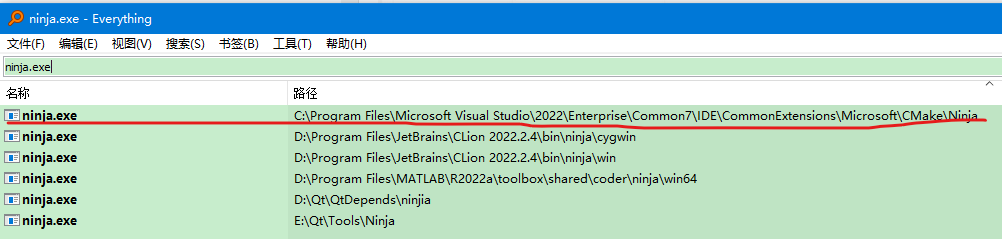 ## 将以上安装软件,安装在默认的位置,如果环境变量中,无相关信息,则手动加上 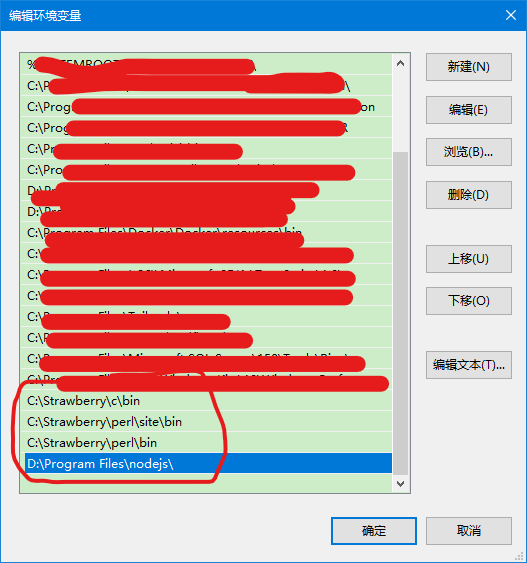 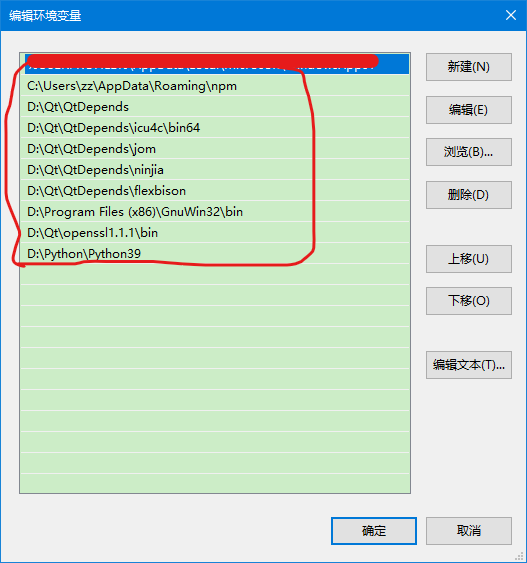 ## 编译openssl1.1.1源码 我这里使用的是vs2022的环境,故oepnssl1.1.1也需要用vs2022重新编译一次。 ```bash call "C:\Program Files\Microsoft Visual Studio\2022\Enterprise\VC\Auxiliary\Build\vcvars64.bat" cd D:\Qt\openssl-1.1.1-1.1.1 D: perl Configure VC-WIN64A no-asm --prefix=D:\Qt\openssl1.1.1 --openssldir=D:\Qt\openssl1.1.1\SSL nmake nmake install ``` ## 编译qt-everywhere-src-5.15.17源码 设置其实蛮多的,经过测试,其实很多设置会根据当前环境自动检测,不需要显示的指定要求。 ### 创建两个脚本文件: 第一个qt5vars.cmd ```bash call "C:\Program Files\Microsoft Visual Studio\2022\Enterprise\VC\Auxiliary\Build\vcvars64.bat" set LLVM_INSTALL_DIR=D:/Qt/QtDepends/libclang SET _ROOT=E:/qt-everywhere-src-5.15.17 set PATH=%LLVM_INSTALL_DIR%/bin;%PATH% SET PATH=%_ROOT%/qtbase/bin;%_ROOT%/gnuwin32/bin;D:/Qt/QtDepends/icu4c/bin64;%PATH% set INCLUDE=D:\Windows Kits\10\Include\10.0.22621.0\ucrt;C:\Program Files\Microsoft Visual Studio\2022\Enterprise\VC\Tools\MSVC\14.43.34808\include;C:\Program Files\Microsoft Visual Studio\2022\Enterprise\VC\Tools\MSVC\14.16.27023\atlmfc\include;C:\Program Files\Microsoft Visual Studio\2022\Enterprise\VC\Tools\MSVC\14.43.34808\include\type_traits set LIB=C:\Program Files\Microsoft Visual Studio\2022\Enterprise\VC\Tools\MSVC\14.43.34808\lib\x64;D:\Windows Kits\10\Lib\10.0.22621.0\um\x64;C:\Program Files\Microsoft Visual Studio\2022\Enterprise\VC\Tools\MSVC\14.16.27023\atlmfc\lib\x64;D:\Windows Kits\10\Lib\10.0.22621.0\ucrt\x64 del config.cache configure -opensource -confirm-license -platform win32-msvc -release -webengine-proprietary-codecs -nomake tests -nomake examples -prefix "D:/Qt/Qt5.15.17/msvc2022_x64" ^ -I "D:\Qt/openssl1.1.1\include" -L "D:\Qt/openssl1.1.1\lib" ^ -I "D:\Qt\QtDepends\icu4c\include" -L "D:\Qt\QtDepends\icu4c\lib64" ``` ==如果编译中找不到头文件,则在上面的INCLUDE中,追加项目,以分号分隔== ==如果编译中找不到库文件,则在上面的LIB中,追加目录,以分号分隔== 第二个run.bat ```bash %SystemRoot%\system32\cmd.exe /E:ON /V:ON /k qt5vars.cmd ``` 把上面两个脚本放置在源目录中。 执行run.bat ```bash + cd qtbase + E:\qt-everywhere-src-5.15.17\qtbase\configure.bat -top-level --help Usage: configure [options] [assignments] Configure understands variable assignments like VAR=value on the command line. Each uppercased library name (obtainable with -list-libraries) supports the suffixes _INCDIR, _LIBDIR, _PREFIX (INCDIR=PREFIX/include, LIBDIR=PREFIX/lib), _LIBS, and - on Windows and Darwin - _LIBS_DEBUG and _LIBS_RELEASE. E.g., ICU_PREFIX=/opt/icu42 ICU_LIBS="-licui18n -licuuc -licudata". It is also possible to manipulate any QMAKE_* variable, to amend the values from the mkspec for the build of Qt itself, e.g., QMAKE_CXXFLAGS+=-g3. Note that the *_LIBS* and QMAKE_* assignments manipulate lists, so items containing meta characters (spaces in particular) need to be quoted according to qmake rules. On top of that, the assignments as a whole need to be quoted according to shell rules. It is recommended to use single quotes for the inner quoting and double quotes for the outer quoting. Top-level installation directories: -prefix <dir> ...... The deployment directory, as seen on the target device. [/usr/local/Qt-$QT_VERSION; qtbase build directory if -developer-build] -extprefix <dir> ... The installation directory, as seen on the host machine. [SYSROOT/PREFIX] -hostprefix [dir] .. The installation directory for build tools running on the host machine. If [dir] is not given, the current build directory will be used. [EXTPREFIX] -external-hostbindir <path> ... Path to Qt tools built for this machine. Use this when -platform does not match the current system, i.e., to make a Canadian Cross Build. Fine tuning of installation directory layout. Note that all directories except -sysconfdir should be located under -prefix/-hostprefix: -bindir <dir> ......... Executables [PREFIX/bin] -headerdir <dir> ...... Header files [PREFIX/include] -libdir <dir> ......... Libraries [PREFIX/lib] -archdatadir <dir> .... Arch-dependent data [PREFIX] -plugindir <dir> ...... Plugins [ARCHDATADIR/plugins] -libexecdir <dir> ..... Helper programs [ARCHDATADIR/bin on Windows, ARCHDATADIR/libexec otherwise] -importdir <dir> ...... QML1 imports [ARCHDATADIR/imports] -qmldir <dir> ......... QML2 imports [ARCHDATADIR/qml] -datadir <dir> ........ Arch-independent data [PREFIX] -docdir <dir> ......... Documentation [DATADIR/doc] -translationdir <dir> . Translations [DATADIR/translations] -sysconfdir <dir> ..... Settings used by Qt programs [PREFIX/etc/xdg] -examplesdir <dir> .... Examples [PREFIX/examples] -testsdir <dir> ....... Tests [PREFIX/tests] -hostbindir <dir> ..... Host executables [HOSTPREFIX/bin] -hostlibdir <dir> ..... Host libraries [HOSTPREFIX/lib] -hostdatadir <dir> .... Data used by qmake [HOSTPREFIX] Conventions for the remaining options: When an option's description is followed by a list of values in brackets, the interpretation is as follows: 'yes' represents the bare option; all other values are possible prefixes to the option, e.g., -no-gui. Alternatively, the value can be assigned, e.g., --gui=yes. Values are listed in the order they are tried if not specified; 'auto' is a shorthand for 'yes/no'. Solitary 'yes' and 'no' represent binary options without auto-detection. Configure meta: -help, -h ............ Display this help screen -verbose, -v ......... Print verbose messages during configuration -continue ............ Continue configure despite errors -redo ................ Re-configure with previously used options. Additional options may be passed, but will not be saved for later use by -redo. -recheck [test,...] .. Discard cached negative configure test results. Use this after installing missing dependencies. Alternatively, if tests are specified, only their results are discarded. -recheck-all ......... Discard all cached configure test results. -feature-<feature> ... Enable <feature> -no-feature-<feature> Disable <feature> [none] -list-features ....... List available features. Note that some features have dedicated command line options as well. -list-libraries ...... List possible external dependencies. Build options: -opensource .......... Build the Open-Source Edition of Qt -commercial .......... Build the Commercial Edition of Qt -confirm-license ..... Automatically acknowledge the license -release ............. Build Qt with debugging turned off [yes] -debug ............... Build Qt with debugging turned on [no] -debug-and-release ... Build two versions of Qt, with and without debugging turned on [yes] (Apple and Windows only) -optimize-debug ...... Enable debug-friendly optimizations in debug builds [auto] (Not supported with MSVC or Clang toolchains) -optimize-size ....... Optimize release builds for size instead of speed [no] -optimized-tools ..... Build optimized host tools even in debug build [no] -force-debug-info .... Create symbol files for release builds [no] -separate-debug-info . Split off debug information to separate files [no] -gdb-index ........... Index the debug info to speed up GDB [no; auto if -developer-build with debug info] -strip ............... Strip release binaries of unneeded symbols [yes] -gc-binaries ......... Place each function or data item into its own section and enable linker garbage collection of unused sections. [auto for static builds, otherwise no] -force-asserts ....... Enable Q_ASSERT even in release builds [no] -developer-build ..... Compile and link Qt for developing Qt itself (exports for auto-tests, extra checks, etc.) [no] -shared .............. Build shared Qt libraries [yes] (no for UIKit) -static .............. Build static Qt libraries [no] (yes for UIKit) -framework ........... Build Qt framework bundles [yes] (Apple only) -platform <target> ... Select host mkspec [detected] -xplatform <target> .. Select target mkspec when cross-compiling [PLATFORM] -device <name> ....... Cross-compile for device <name> -device-option <key=value> ... Add option for the device mkspec -appstore-compliant .. Disable code that is not allowed in platform app stores. This is on by default for platforms which require distribution through an app store by default, in particular Android, iOS, tvOS, watchOS, and Universal Windows Platform. [auto] -qtnamespace <name> .. Wrap all Qt library code in 'namespace <name> {...}'. -qtlibinfix <infix> .. Rename all libQt5*.so to libQt5*<infix>.so. -qtlibinfix-plugins .. Rename Qt plugins according to -qtlibinfix [no] -testcocoon .......... Instrument with the TestCocoon code coverage tool [no] -gcov ................ Instrument with the GCov code coverage tool [no] -trace [backend] ..... Enable instrumentation with tracepoints. Currently supported backends are 'etw' (Windows) and 'lttng' (Linux), or 'yes' for auto-detection. [no] -sanitize {address|thread|memory|fuzzer-no-link|undefined} Instrument with the specified compiler sanitizer. Note that some sanitizers cannot be combined; for example, -sanitize address cannot be combined with -sanitize thread. -coverage {trace-pc-guard|source-based} Specify the 'trace-pc-guard' coverage instrumentation for sanitizers or generate instrumented code to collect execution counts and enable code coverage analysis, respectively. (Clang only) -c++std <edition> .... Select C++ standard <edition> [c++2b/c++2a/c++17/c++14/c++11] (Not supported with MSVC 2015) -sse2 ................ Use SSE2 instructions [auto] -sse3/-ssse3/-sse4.1/-sse4.2/-avx/-avx2/-avx512 Enable use of particular x86 instructions [auto] Enabled ones are still subject to runtime detection. -mips_dsp/-mips_dspr2 Use MIPS DSP/rev2 instructions [auto] -qreal <type> ........ typedef qreal to the specified type. [double] Note: this affects binary compatibility. -R <string> .......... Add an explicit runtime library path to the Qt libraries. Supports paths relative to LIBDIR. -rpath ............... Link Qt libraries and executables using the library install path as a runtime library path. Similar to -R LIBDIR. On Apple platforms, disabling this implies using absolute install names (based in LIBDIR) for dynamic libraries and frameworks. [auto] -reduce-exports ...... Reduce amount of exported symbols [auto] -reduce-relocations .. Reduce amount of relocations [auto] (Unix only) -plugin-manifests .... Embed manifests into plugins [no] (Windows only) -static-runtime ...... With -static, use static runtime [no] (Windows only) -pch ................. Use precompiled headers [auto] -ltcg ................ Use Link Time Code Generation [no] -linker [bfd,gold,lld] Force use of the GNU ld, GNU gold or LLVM/LLD linker instead of default one (GCC only) -incredibuild-xge .... Use the IncrediBuild XGE [no] (Windows only) -ccache .............. Use the ccache compiler cache [no] (Unix only) -make-tool <tool> .... Use <tool> to build qmake [nmake] (Windows only) -mp .................. Use multiple processors for compilation (MSVC only) -warnings-are-errors . Treat warnings as errors [no; yes if -developer-build] -silent .............. Reduce the build output so that warnings and errors can be seen more easily Build environment: -sysroot <dir> ....... Set <dir> as the target sysroot -gcc-sysroot ......... With -sysroot, pass --sysroot to the compiler [yes] -pkg-config .......... Use pkg-config [auto] (Unix only) -D <string> .......... Pass additional preprocessor define -I <string> .......... Pass additional include path -L <string> .......... Pass additional library path -F <string> .......... Pass additional framework path (Apple only) -sdk <sdk> ........... Build Qt using Apple provided SDK <sdk>. The argument should be one of the available SDKs as listed by 'xcodebuild -showsdks'. Note that the argument applies only to Qt libraries and applications built using the target mkspec - not host tools such as qmake, moc, rcc, etc. -android-sdk path .... Set Android SDK root path [$ANDROID_SDK_ROOT] -android-ndk path .... Set Android NDK root path [$ANDROID_NDK_ROOT] -android-ndk-platform Set Android platform -android-ndk-host .... Set Android NDK host (linux-x86, linux-x86_64, etc.) [$ANDROID_NDK_HOST] -android-abis ....... Comma separated Android abis, default is: armeabi-v7a,arm64-v8a,x86,x86_64 -android-javac-target Set the javac build target version [7] -android-javac-source Set the javac build source version [7] -android-style-assets Automatically extract style assets from the device at run time. This option makes the Android style behave correctly, but also makes the Android platform plugin incompatible with the LGPL2.1. [yes] Component selection: -skip <repo> ......... Exclude an entire repository from the build. -make <part> ......... Add <part> to the list of parts to be built. Specifying this option clears the default list first. [libs and examples, also tools if not cross-building, also tests if -developer-build] -nomake <part> ....... Exclude <part> from the list of parts to be built. -compile-examples .... When unset, install only the sources of examples [no on WebAssembly, otherwise yes] -gui ................. Build the Qt GUI module and dependencies [yes] -widgets ............. Build the Qt Widgets module and dependencies [yes] -no-dbus ............. Do not build the Qt D-Bus module [default on Android and Windows] -dbus-linked ......... Build Qt D-Bus and link to libdbus-1 [auto] -dbus-runtime ........ Build Qt D-Bus and dynamically load libdbus-1 [no] -accessibility ....... Enable accessibility support [yes] Note: Disabling accessibility is not recommended. Qt comes with bundled copies of some 3rd party libraries. These are used by default if auto-detection of the respective system library fails. Core options: -doubleconversion .... Select used double conversion library [system/qt/no] No implies use of sscanf_l and snprintf_l (imprecise). -glib ................ Enable Glib support [no; auto on Unix] -eventfd ............. Enable eventfd support -inotify ............. Enable inotify support -iconv ............... Enable iconv(3) support [posix/sun/gnu/no] (Unix only) -icu ................. Enable ICU support [auto] -pcre ................ Select used libpcre2 [system/qt/no] -pps ................. Enable PPS support [auto] (QNX only) -zlib ................ Select used zlib [system/qt] Logging backends: -journald .......... Enable journald support [no] (Unix only) -syslog ............ Enable syslog support [no] (Unix only) -slog2 ............. Enable slog2 support [auto] (QNX only) Network options: -ssl ................. Enable either SSL support method [auto] -no-openssl .......... Do not use OpenSSL [default on Apple and WinRT] -openssl-linked ...... Use OpenSSL and link to libssl [no] -openssl-runtime ..... Use OpenSSL and dynamically load libssl [auto] -schannel ............ Use Secure Channel [no] (Windows only) -securetransport ..... Use SecureTransport [auto] (Apple only) -sctp ................ Enable SCTP support [no] -libproxy ............ Enable use of libproxy [no] -system-proxies ...... Use system network proxies by default [yes] Gui, printing, widget options: -cups ................ Enable CUPS support [auto] (Unix only) -fontconfig .......... Enable Fontconfig support [auto] (Unix only) -freetype ............ Select used FreeType [system/qt/no] -harfbuzz ............ Select used HarfBuzz-NG [system/qt/no] (Not auto-detected on Apple and Windows) -gtk ................. Enable GTK platform theme support [auto] -lgmon ............... Enable lgmon support [auto] (QNX only) -no-opengl ........... Disable OpenGL support -opengl <api> ........ Enable OpenGL support. Supported APIs: es2 (default on Windows), desktop (default on Unix), dynamic (Windows only) -opengles3 ........... Enable OpenGL ES 3.x support instead of ES 2.x [auto] -egl ................. Enable EGL support [auto] -angle ............... Use bundled ANGLE to support OpenGL ES 2.0 [auto] (Windows only) -combined-angle-lib .. Merge LibEGL and LibGLESv2 into LibANGLE (Windows only) -qpa <name> .......... Select default QPA backend(s) (e.g., xcb, cocoa, windows) A prioritized list separated by semi-colons. -xcb-xlib............. Enable Xcb-Xlib support [auto] Platform backends: -direct2d .......... Enable Direct2D support [auto] (Windows only) -directfb .......... Enable DirectFB support [no] (Unix only) -eglfs ............. Enable EGLFS support [auto; no on Android and Windows] -gbm ............... Enable backends for GBM [auto] (Linux only) -kms ............... Enable backends for KMS [auto] (Linux only) -linuxfb ........... Enable Linux Framebuffer support [auto] (Linux only) -xcb ............... Enable X11 support [auto] (Linux only) Input backends: -libudev............ Enable udev support [auto] -evdev ............. Enable evdev support [auto] -imf ............... Enable IMF support [auto] (QNX only) -libinput .......... Enable libinput support [auto] -mtdev ............. Enable mtdev support [auto] -tslib ............. Enable tslib support [auto] -bundled-xcb-xinput Use bundled XInput2 support [auto] -xkbcommon ......... Enable key mapping support [auto] Image formats: -gif ............... Enable reading support for GIF [auto] -ico ............... Enable support for ICO [yes] -libpng ............ Select used libpng [system/qt/no] -libjpeg ........... Select used libjpeg [system/qt/no] Database options: -sql-<driver> ........ Enable SQL <driver> plugin. Supported drivers: db2 ibase mysql oci odbc psql sqlite2 sqlite tds [all auto] -sqlite .............. Select used sqlite3 [system/qt] Qt3D options: -assimp .............. Select used assimp library [system/qt/no] -qt3d-profile-jobs ... Enable jobs profiling [no] -qt3d-profile-gl ..... Enable OpenGL profiling [no] -qt3d-simd ........... Select level of SIMD support [no/sse2/avx2] -qt3d-render ......... Enable the Qt3D Render aspect [yes] -qt3d-input .......... Enable the Qt3D Input aspect [yes] -qt3d-logic .......... Enable the Qt3D Logic aspect [yes] -qt3d-extras ......... Enable the Qt3D Extras aspect [yes] -qt3d-animation....... Enable the Qt3D Animation aspect [yes] Further image format options: -jasper .............. Enable JPEG-2000 support using the JasPer library [no] -mng ................. Enable MNG support [no] -tiff ................ Enable TIFF support [system/qt/no] -webp ................ Enable WEBP support [system/qt/no] Multimedia options: -pulseaudio .......... Enable PulseAudio support [auto] (Unix only) -alsa ................ Enable ALSA support [auto] (Unix only) -no-gstreamer ........ Disable support for GStreamer -gstreamer [version] . Enable GStreamer support [auto] With no parameter, 1.0 is tried first, then 0.10. -evr ................. Enables EVR in DirectShow and WMF [auto] QtQuick3D options: -assimp .............. Select used assimp library [system/qt/no] TextToSpeech options: -flite ............... Enable Flite support [auto] (Unix only) -flite-alsa .......... Enable Flite with ALSA support [auto] (Unix only) -speechd ............. Enable speech dispatcher support [auto] (Unix only) WebEngine options: -webengine-alsa ................ Enable ALSA support [auto] (Linux only) -webengine-pulseaudio .......... Enable PulseAudio support [auto] (Linux only) -webengine-embedded-build ...... Enable Linux embedded build [auto] (Linux only) -webengine-icu ................. Use system ICU libraries [system/qt] (Linux only) -webengine-ffmpeg .............. Use system FFmpeg libraries [system/qt] (Linux only) -webengine-opus ................ Use system Opus libraries [system/qt] (Linux only) -webengine-webp ................ Use system WebP libraries [system/qt] (Linux only) -webengine-pepper-plugins ...... Enable use of Pepper Flash and Widevine plugins [auto] -webengine-python-version ...... Use specific python version for building [python2/python3] -webengine-printing-and-pdf .... Enable use of printing and output to PDF [auto] -webengine-proprietary-codecs .. Enable support for proprietary codecs [no] -webengine-spellchecker ........ Enable support for spellchecker [yes] -webengine-native-spellchecker . Enable support for native spellchecker [no] (macOS only) -webengine-webrtc .............. Enable support for WebRTC [auto] ``` ==大部分配置都是可以根据环境自动检测,不需要使能,只有部分子功能需要显示使能== ### 编译和安装 ```bash jom jom install ``` ==可以通过指定模块名称,来只编译指定的模块== ```bash jom -j8 module-qtwebengine ``` -j8是指8个线程同时编译。 module-qtwebengine是指只编译与qtwebengine有个的及其依赖项,以节省编译时间。 ==上面的jom命令也可以换成nmake命令(windows下用msvc编译的话)== # 遇到的问题 ## 环境配置的问题1 LLVM_INSTALL_DIR问题 这个问题虽然跟QDoc的编译有关系,其实项目中用不用也不是大的问题,但是要解决该问题,确实可以忽略的,但是但是,假如必须要用到qdoc呢?? 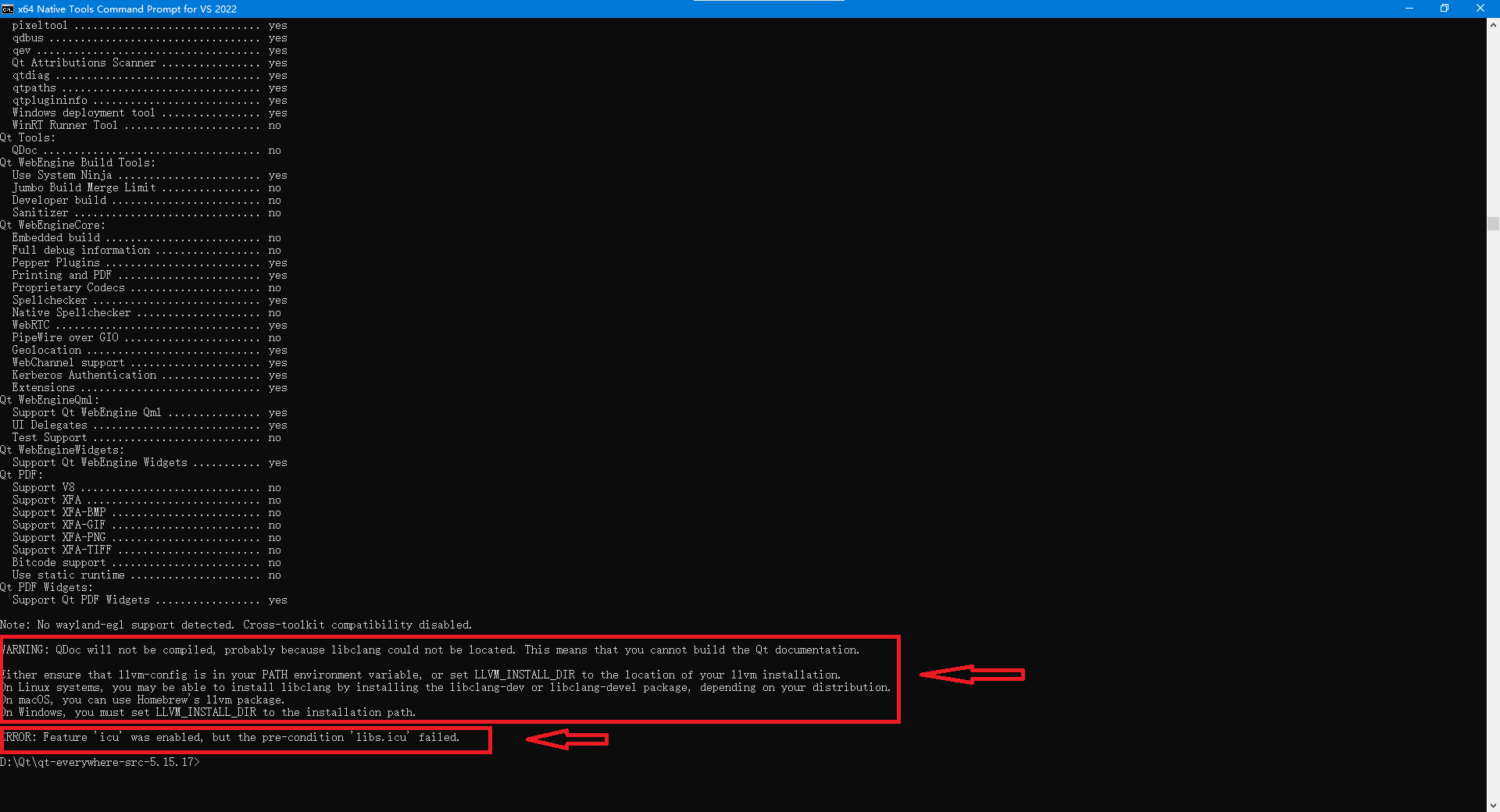  ==解决方案== 不能使用太高版本的libclang,官方已经提供20以上的最新版本,但是5.15只需要6以上的版本就ok了,所以,我这里下载的是10.0版本 https://download.qt.io/development_releases/prebuilt/libclang/libclang-release_100-based-windows-vs2019_64.7z https://download.qt.io/development_releases/prebuilt 路径下面提供多种工具,其实是可以从这里下载一些依赖工具的。 ## 环境配置问题2 libs.icu failed 这个问题,仍然是版本的问题,官方已经提供icu4c77以上版本,而经过尝试,发现使用icu4c69.1版本即无此问题。 https://github.com/unicode-org/icu/releases/download/release-69-1/icu4c-69_1-Win64-MSVC2019.zip ## 环境配置问题3 path is on mount 'C:',start on mount 'D:' 这个问题,是Python版本的问题,python3.8-3.12等版本都试过了,不能解决该问题,必须使用python2.7.11以后版本,目前最新版是2.7.18版本。 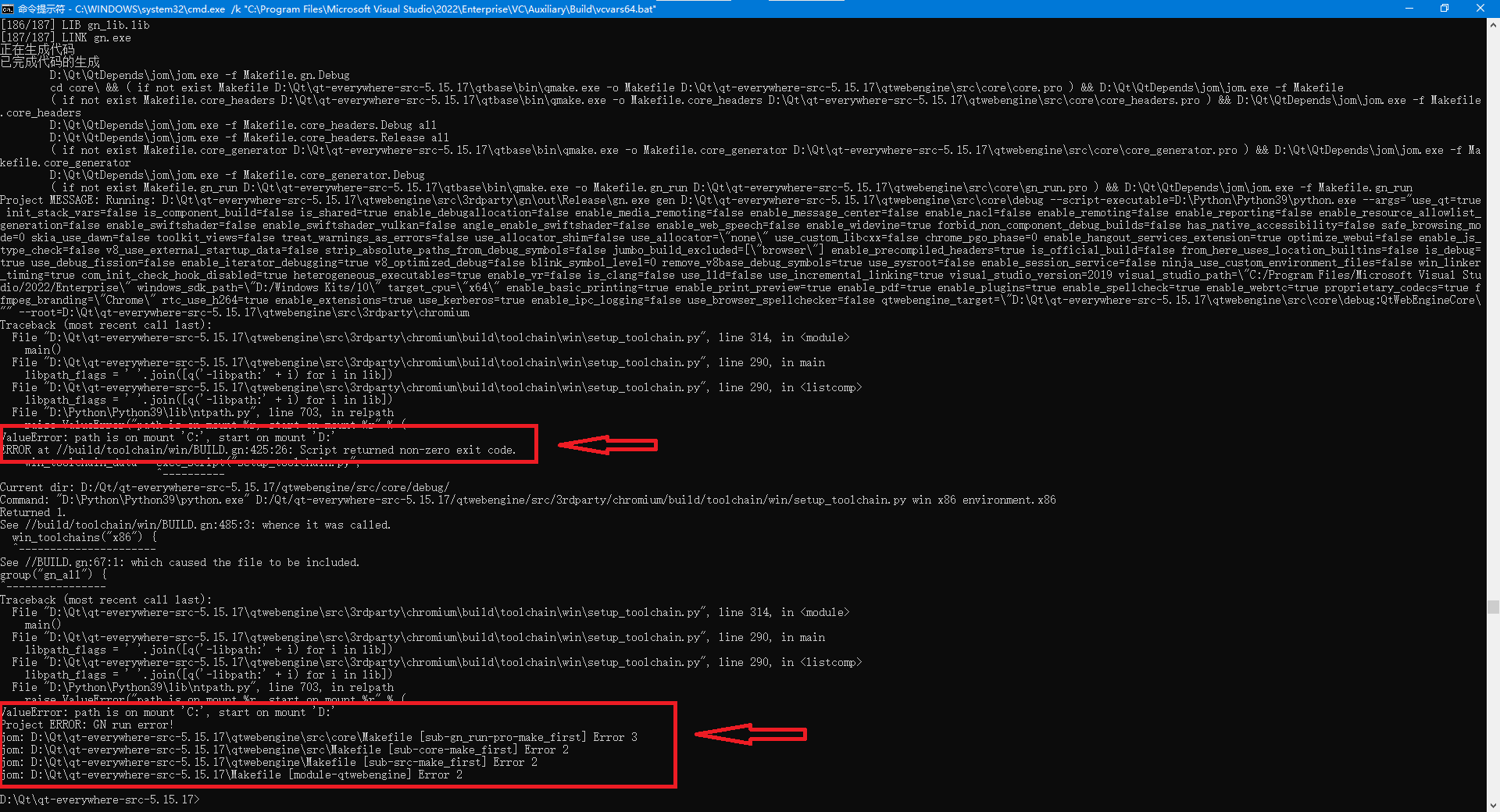 ## 环境配置问题4 atlbase.h 无法打开包含文件,No such file or directory atls.lib 这个问题,一般是安装的环境不正确,==必须安装atl组件和MFC相关的工具,否则找不到相关的头文件和库定义==。 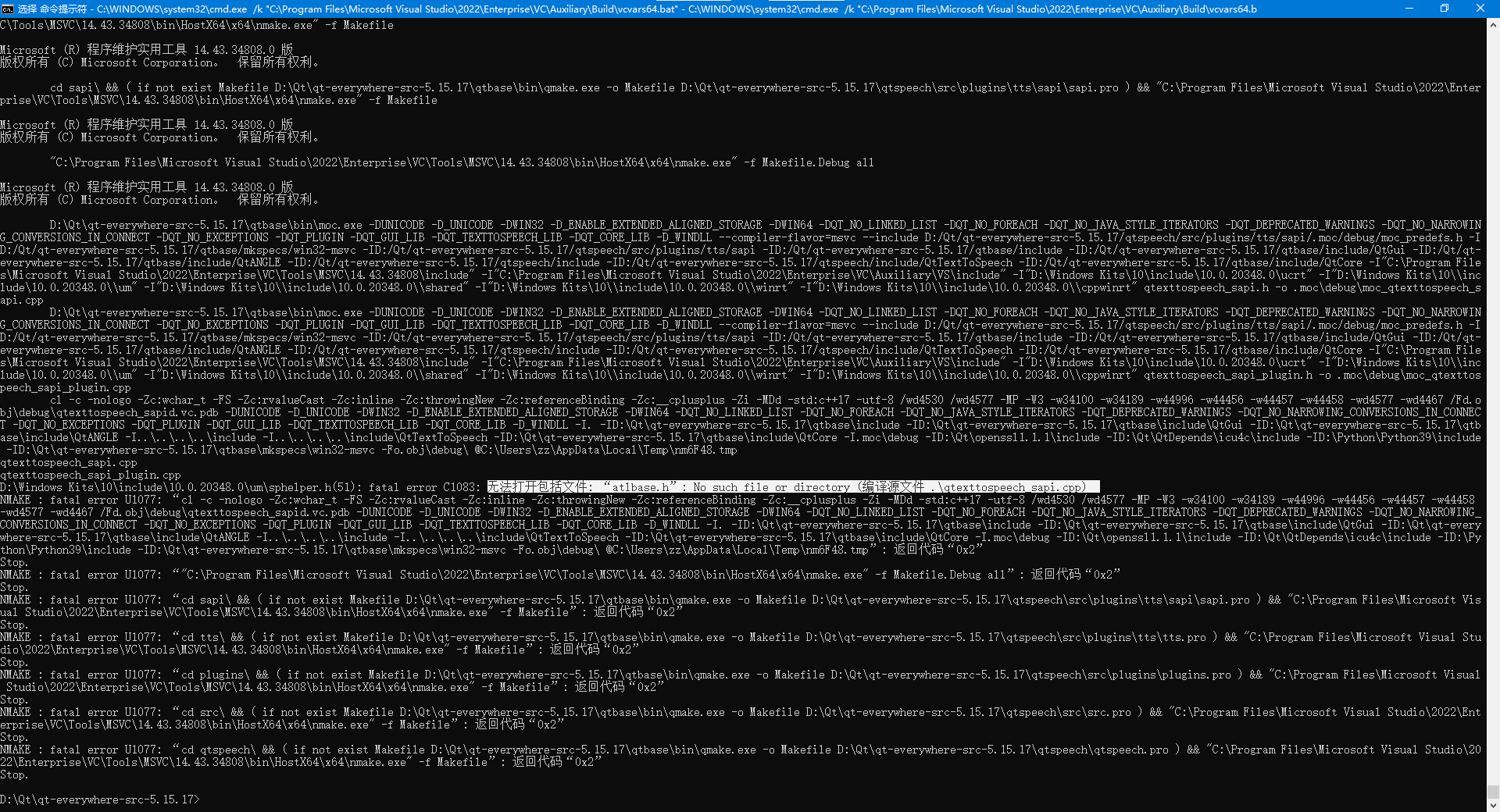 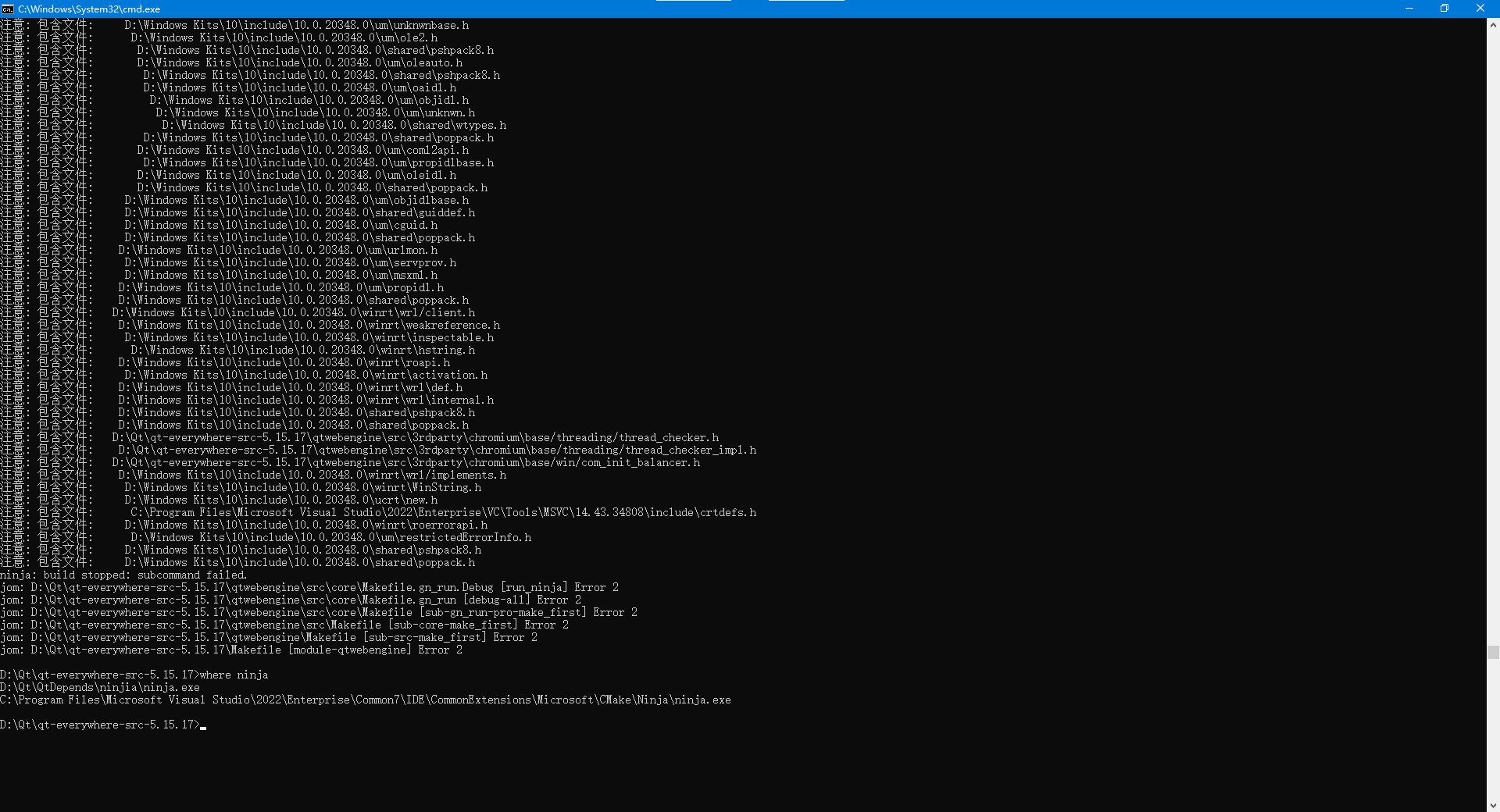 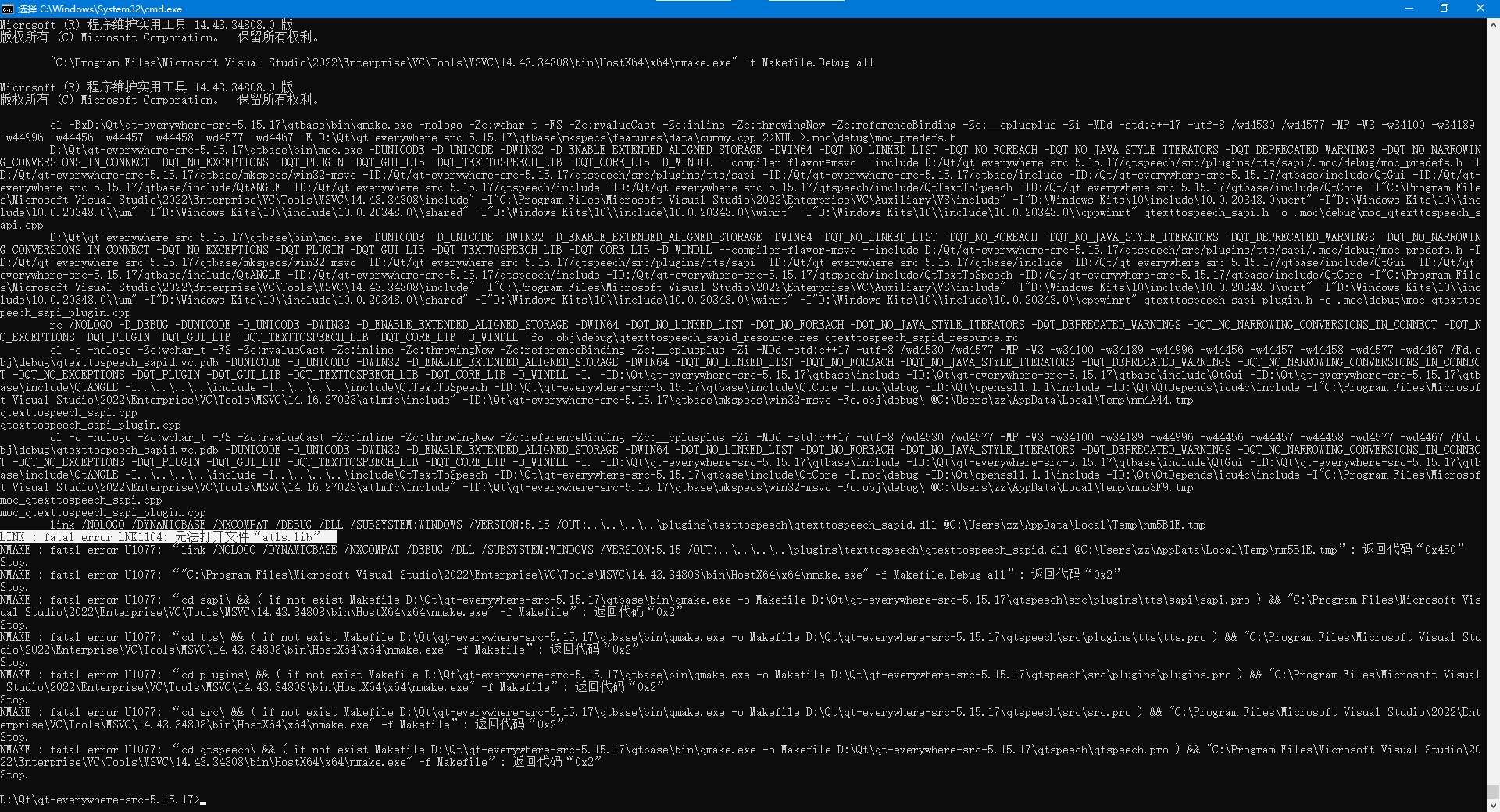 == cstring则是MFC库中的文件== 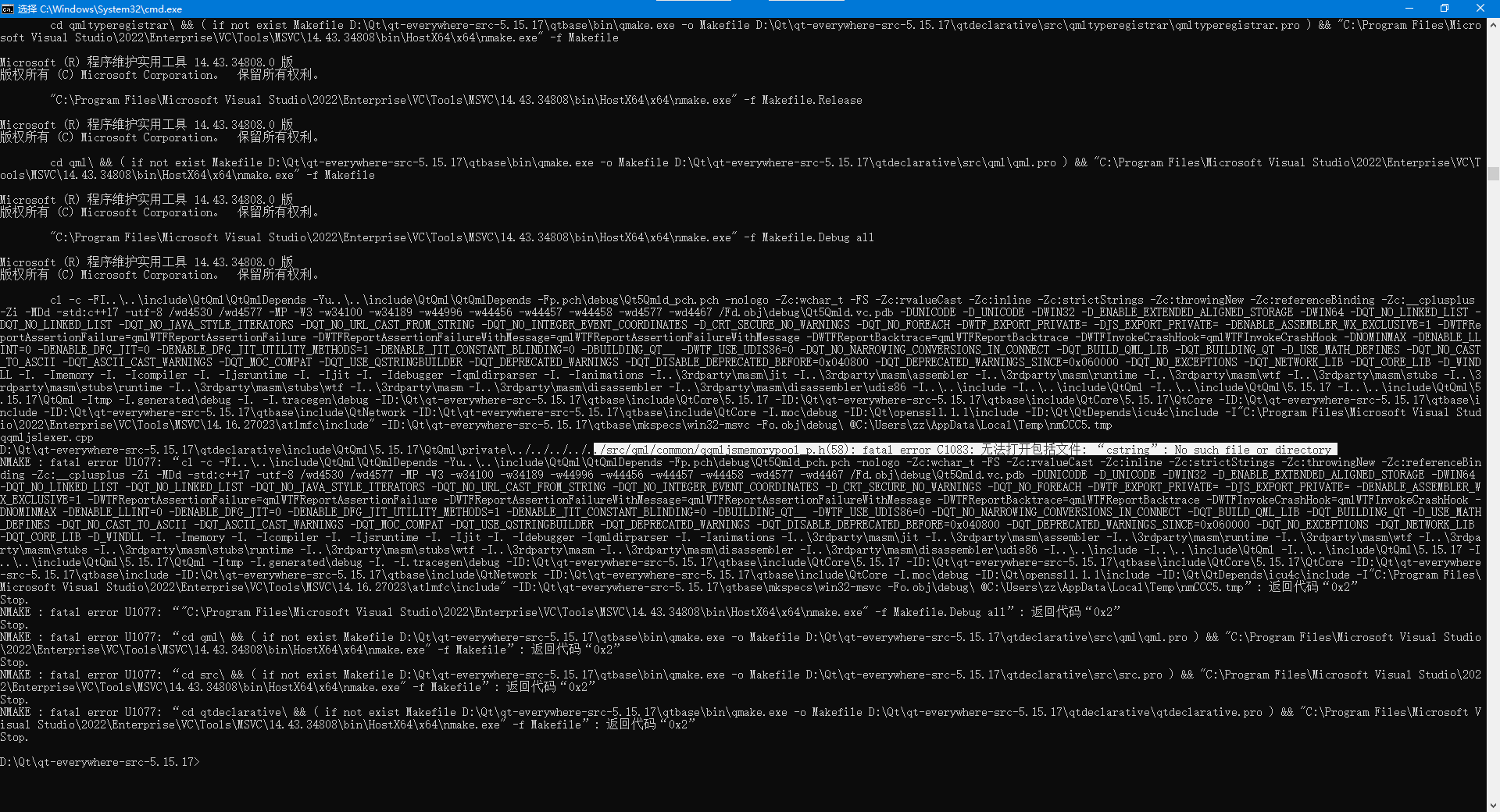 ==在安装vs2022时,记得选上下面这三个组件== 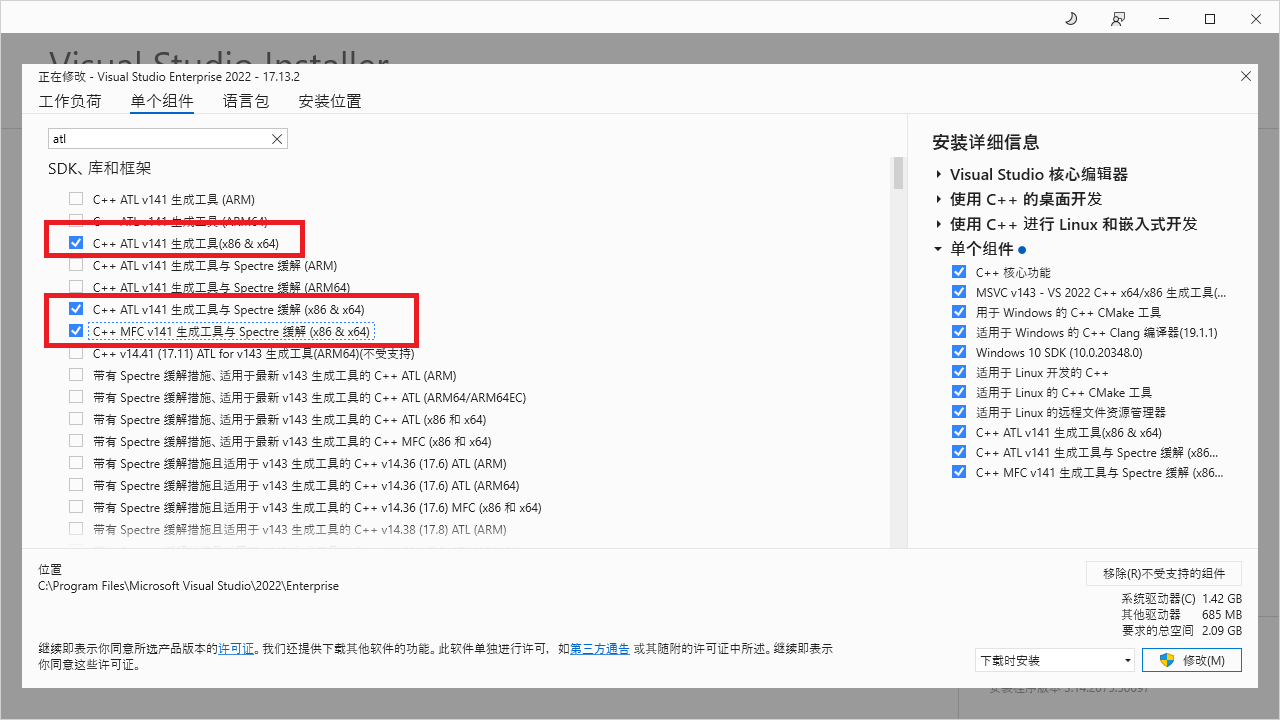 ## 环境配置问题5 无法打开包括文件 windows.devices.sensors.h 这个问题,感觉像是windows kits安装有问题,找不到这个环境和目录。 ==可以在INCLUDE中添加目录,或者重新安装windows kits== 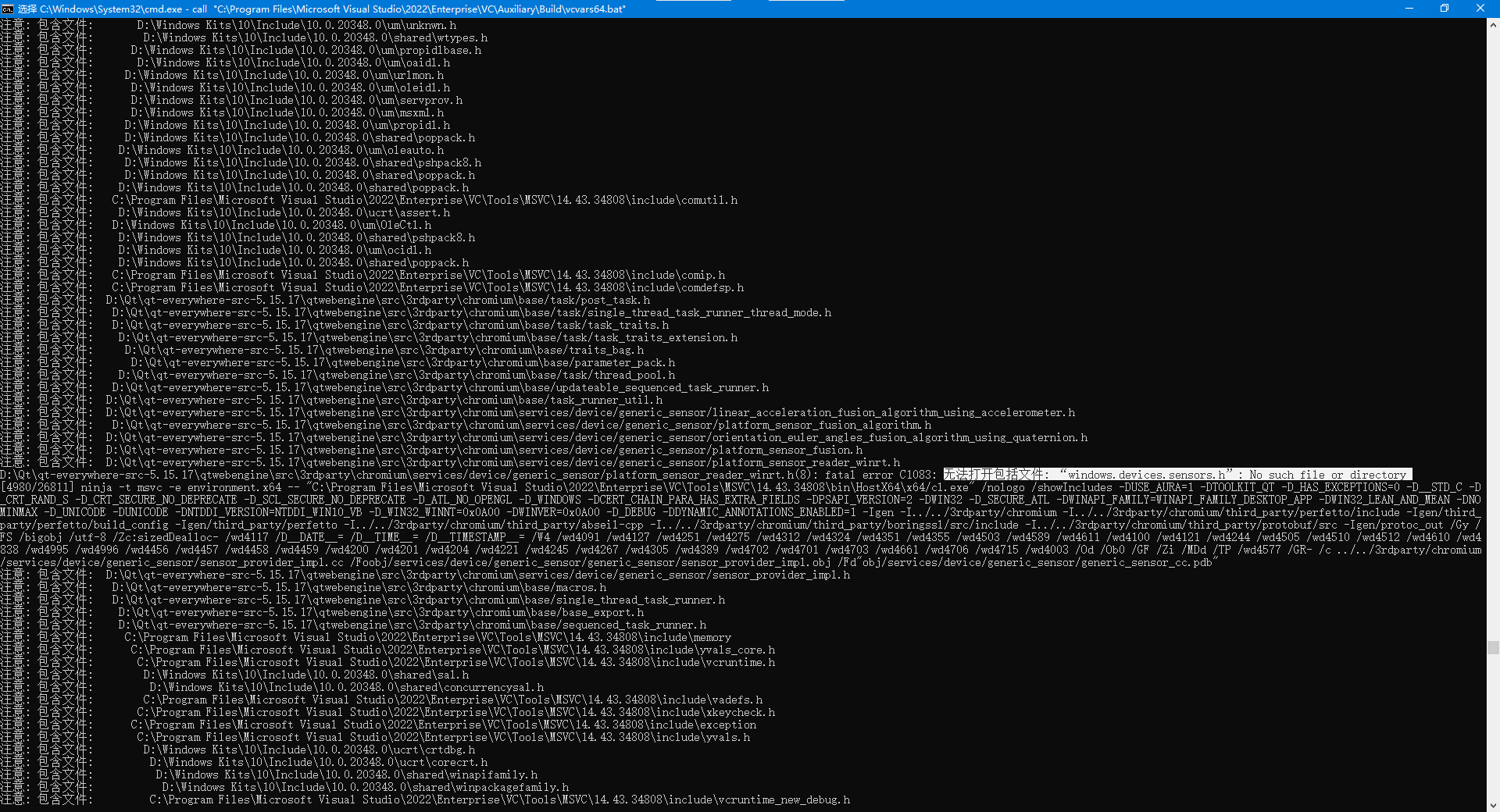 最后,我是通过vs2022程序,卸载,并重新安装了vs2022,windows kits 10和11。 但是最终还是在INCLUDE中添加了目录。 # 总结 为了编译Qt5.15.17源码,我花了整整2周时间,要编译基础了qt可能很简单,但是要编译qtwebengine,真的很麻烦,最后快要放弃了。至少目前还没有成功地运用。 自己笔记本16GB内存,编译了一晚上,最后却告知内存不足,至此,彻底要放弃了。 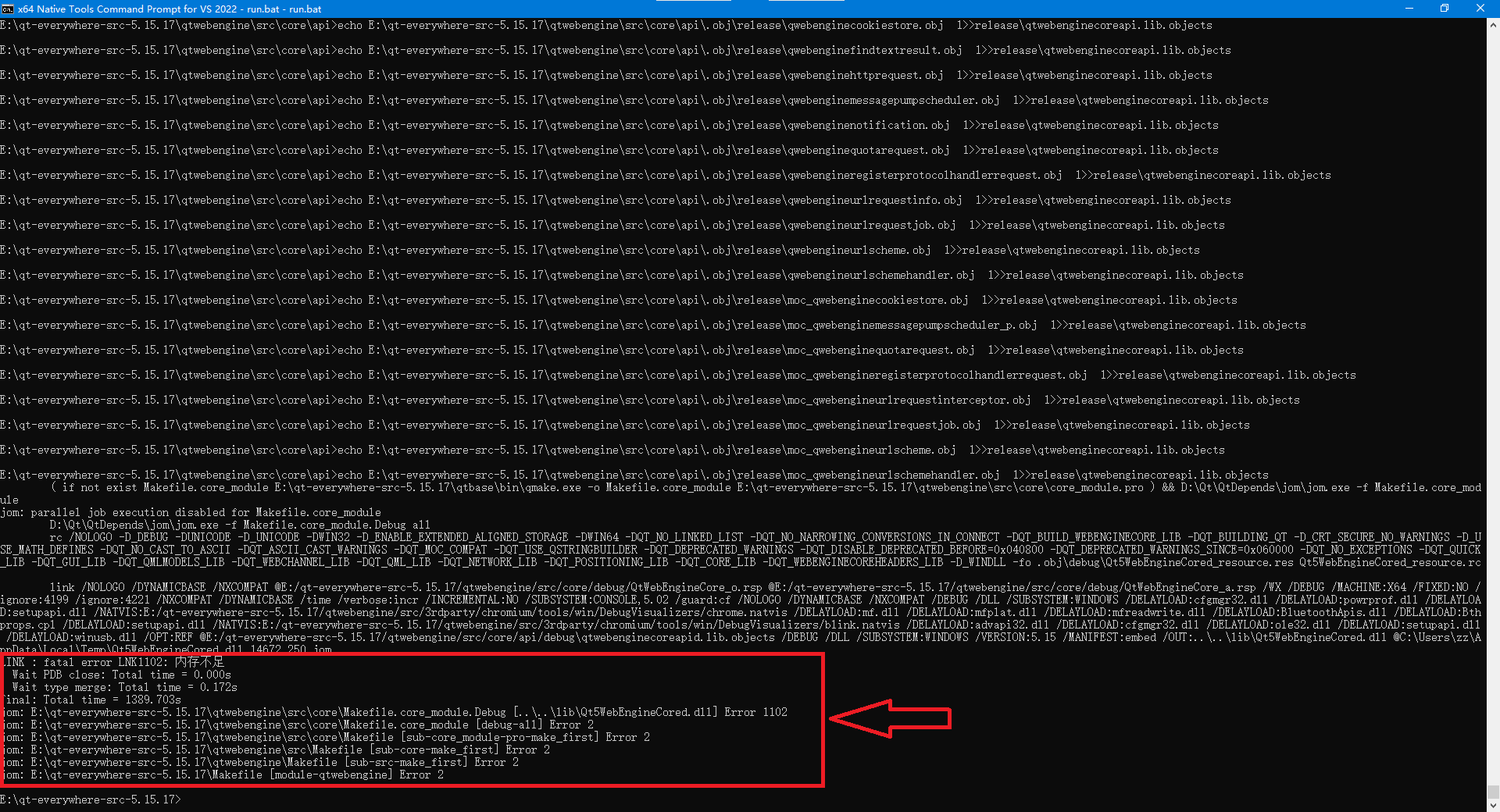 到目前,以上配置,在公司电脑上能够生成出库,但是不能够正常调用opengl,是我目前的问题,也是下一步将要捋清楚和搞明白的。 # 附官方编译说明网站 [qt5 build for windows](https://qthub.com/static/doc/qt5/qtdoc/windows-building.html# "qt5 build for windows") 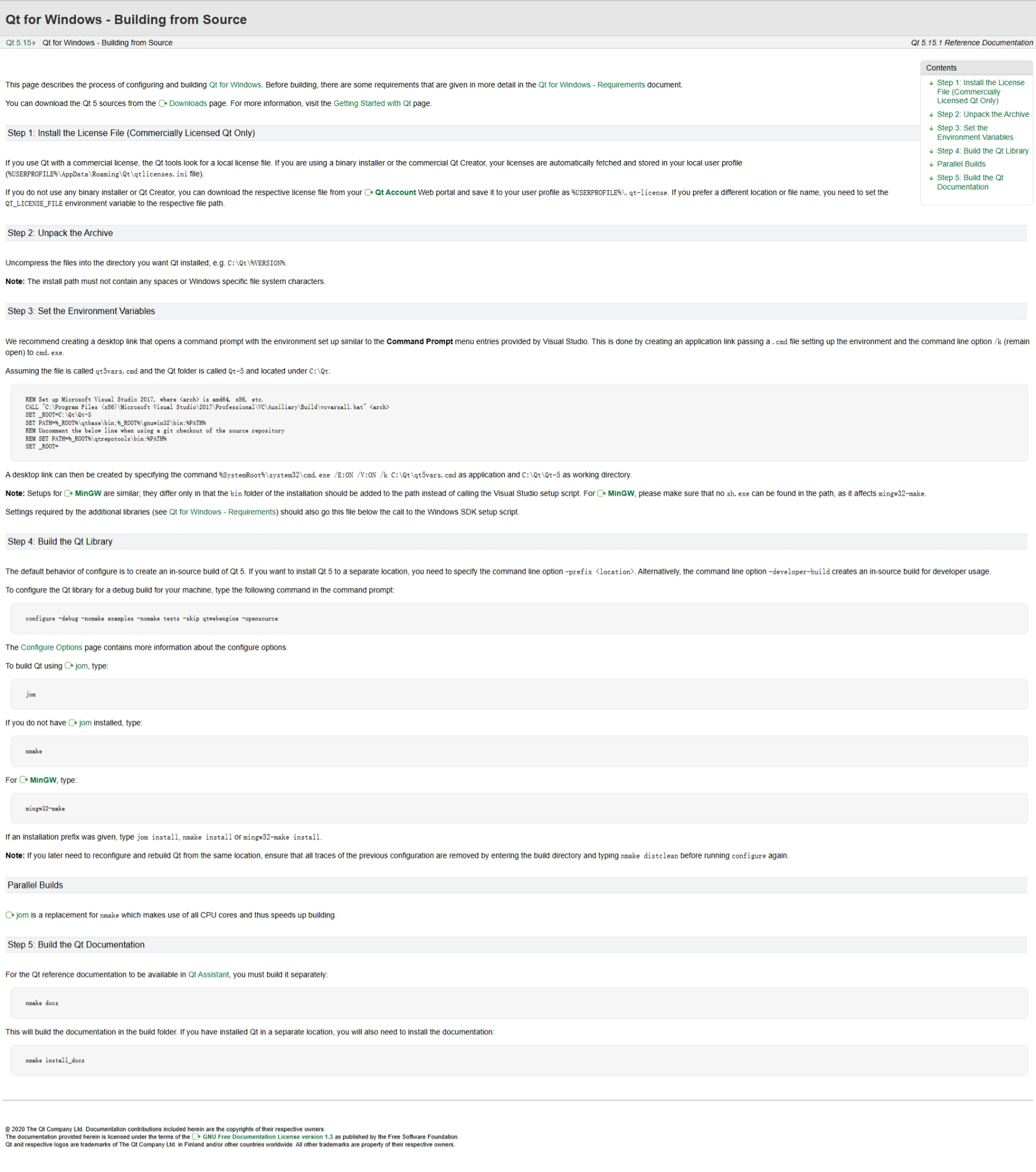
虚拟世界
2025年7月14日 23:36
转发文档
收藏文档
上一篇
下一篇
手机扫码
复制链接
手机扫一扫转发分享
复制链接
Markdown文件
分享
链接
类型
密码
更新密码