知识
[大模型]离线更新本地ollama模型,拷贝ollama模型到离线电脑中安装使用deepseekR1模型更新增量更新update models
[大模型]使用chatbox和open-webui同时调用ollama管理器cs模式和bs模式同时使用,调用ollama:11434端口连接被对方重设关联deepseek
[大模型]ollama工具升级docker中升级ollama下载速度很慢的解决方案
[大模型]ollama容器离线升级ollama手动升级0.6.8
[大模型]Ollama pull拉取大模型时速度很慢slow download model file
本文档使用 MrDoc 发布
-
+
首页
[大模型]Ollama pull拉取大模型时速度很慢slow download model file
# 说明 最近在更新大模型时,发现ollama下载模型很慢,折腾了很久,设置代理然后,设置镜像网站,等等都不行。 折腾了好久,才勉强算是有了一个方案。 对了,脚本全部由TRAE完成,自己未写一字。 # 解决方案 ==通过重启pull的方式进行,也就是过一段时间就重启下载== ==实现实时监控速度,低于指定值则重启下载== **脚本使用方法:** ```bash Ollamapull.bat qwen3-next:80b ``` 以下为windows下的bash脚本 Ollamapull.bat: ```bash @echo off :: Simple batch wrapper for PowerShell Ollama download script :: Check parameters if "%1" equ "" ( echo Usage: %0 model_name echo Example: %0 qwen3-next:80b pause exit /b 1 ) :: Run PowerShell script powershell -ExecutionPolicy Bypass -File "%~dp0OllamaPull.ps1" "%1" :: Return PowerShell exit code exit /b %errorlevel% ``` 以下为windows下powershell脚本 OllamaPull.ps1: ```shell <# .SYNOPSIS Ollama Model Download Script with Real-time Speed Monitoring .DESCRIPTION This script downloads Ollama models with real-time speed monitoring. It restarts the download if the speed drops below 1MB/s. If speed is below threshold, it exits and waits 5 seconds before restarting. .PARAMETER Model The name of the Ollama model to download (e.g., qwen3-next:80b) .EXAMPLE .OllamaPull.ps1 qwen3-next:80b #> param( [Parameter(Mandatory=$true, HelpMessage="Model name to download")] [string]$Model ) # Set console encoding to UTF-8 to prevent garbled output [Console]::OutputEncoding = [System.Text.Encoding]::UTF8 # Configuration $MinSpeedKB = 1024 # Minimum speed in KB/s (1MB/s) $MaxRetries = 50 # Maximum number of retries $CheckInterval = 30 # Check interval in seconds $RestartDelay = 5 # Delay between restarts in seconds # Display configuration Write-Host "Ollama Model Download Script" -ForegroundColor Cyan Write-Host "Model: $Model" -ForegroundColor Green Write-Host "Minimum Speed: $MinSpeedKB KB/s (1MB/s)" -ForegroundColor Green Write-Host "Check Interval: $CheckInterval seconds" -ForegroundColor Green Write-Host "Restart Delay: $RestartDelay seconds" -ForegroundColor Green Write-Host "Maximum Retries: $MaxRetries" -ForegroundColor Green Write-Host "=" * 60 $retryCount = 0 $success = $false while (-not $success -and $retryCount -lt $MaxRetries) { $retryCount++ Write-Host "`n[Attempt $retryCount/$MaxRetries] Starting ollama pull $Model..." -ForegroundColor Yellow Write-Host "====================================================" -ForegroundColor Yellow # Check if ollama is available $ollamaPath = Get-Command "ollama" -ErrorAction SilentlyContinue if (-not $ollamaPath) { Write-Host "ERROR: ollama command not found! Please check installation." -ForegroundColor Red exit 1 } try { # Start ollama process with asynchronous output capture $process = New-Object System.Diagnostics.Process $process.StartInfo.FileName = $ollamaPath.Source $process.StartInfo.Arguments = "pull", $Model $process.StartInfo.UseShellExecute = $false $process.StartInfo.RedirectStandardOutput = $true $process.StartInfo.RedirectStandardError = $true $process.StartInfo.CreateNoWindow = $true # Initialize output buffer $outputBuffer = [System.Text.StringBuilder]::new() # Register output event handler $eventHandler = Register-ObjectEvent -InputObject $process -EventName OutputDataReceived -Action { param($sender, $e) if (-not [string]::IsNullOrEmpty($e.Data)) { [System.Threading.Monitor]::Enter($outputBuffer) try { $outputBuffer.AppendLine($e.Data) Write-Host $e.Data } finally { [System.Threading.Monitor]::Exit($outputBuffer) } } } # Register error event handler $errorHandler = Register-ObjectEvent -InputObject $process -EventName ErrorDataReceived -Action { param($sender, $e) if (-not [string]::IsNullOrEmpty($e.Data)) { [System.Threading.Monitor]::Enter($outputBuffer) try { $outputBuffer.AppendLine($e.Data) Write-Host $e.Data -ForegroundColor Red } finally { [System.Threading.Monitor]::Exit($outputBuffer) } } } # Start the process $process.Start() | Out-Null $process.BeginOutputReadLine() $process.BeginErrorReadLine() # Initialize monitoring variables $lastSpeedCheck = Get-Date $speedBelowThreshold = $false # Monitor process output and speed while (-not $process.HasExited -and -not $speedBelowThreshold) { # Check speed periodically $currentTime = Get-Date $elapsedSeconds = ($currentTime - $lastSpeedCheck).TotalSeconds if ($elapsedSeconds -ge $CheckInterval) { $lastSpeedCheck = $currentTime # Get current output content $content = $null [System.Threading.Monitor]::Enter($outputBuffer) try { $content = $outputBuffer.ToString() } finally { [System.Threading.Monitor]::Exit($outputBuffer) } if ($content) { # Match speed patterns like: 702 KB/s, 1.23 MB/s, 702KB/s $speedPattern = '([0-9]+(?:\.[0-9]+)?)\s*(KB/s|MB/s)' $speedMatch = [regex]::Match($content, $speedPattern, [System.Text.RegularExpressions.RegexOptions]::RightToLeft) if ($speedMatch.Success) { $speedValue = [double]$speedMatch.Groups[1].Value $speedUnit = $speedMatch.Groups[2].Value # Convert to KB/s for comparison $speedInKB = $speedValue if ($speedUnit -eq 'MB/s') { $speedInKB = $speedValue * 1024 } # Format display speed $displaySpeed = if ($speedInKB -ge 1024) { "{0:N2} MB/s" -f ($speedInKB / 1024) } else { "{0} KB/s" -f $speedInKB } # Display speed information Write-Host "`n[Speed Monitor] Current Speed: $displaySpeed (Threshold: $MinSpeedKB KB/s)" -ForegroundColor Blue # Check if speed is below threshold if ($speedInKB -lt $MinSpeedKB) { Write-Host "[Speed Monitor] ?? SPEED BELOW THRESHOLD! Stopping download..." -ForegroundColor Red $speedBelowThreshold = $true $process.Kill() } else { Write-Host "[Speed Monitor] ? Speed is normal, continuing..." -ForegroundColor Green } } else { Write-Host "`n[Speed Monitor] Waiting for speed information..." -ForegroundColor Gray } } } # Sleep to reduce CPU usage Start-Sleep -Milliseconds 300 } # Unregister event handlers Unregister-Event -SourceIdentifier $eventHandler.Name -ErrorAction SilentlyContinue Unregister-Event -SourceIdentifier $errorHandler.Name -ErrorAction SilentlyContinue Remove-Job -Name $eventHandler.Name -ErrorAction SilentlyContinue Remove-Job -Name $errorHandler.Name -ErrorAction SilentlyContinue # Check exit status if ($process.HasExited) { if ($process.ExitCode -eq 0) { $success = $true Write-Host "`n====================================================" -ForegroundColor Green Write-Host "[Success] Download completed successfully!" -ForegroundColor Green } else { Write-Host "`n====================================================" -ForegroundColor Red Write-Host "[Error] Download failed with exit code $($process.ExitCode)" -ForegroundColor Red } } # If speed was below threshold, restart after waiting if ($speedBelowThreshold) { Write-Host "====================================================" -ForegroundColor Yellow Write-Host "[Restart] Waiting $RestartDelay seconds before restarting..." -ForegroundColor Yellow Start-Sleep -Seconds $RestartDelay } } catch { Write-Host "`n[Error] An exception occurred: $($_.Exception.Message)" -ForegroundColor Red } finally { # Kill process if still running if ($process -and -not $process.HasExited) { $process.Kill() } } } if (-not $success) { Write-Host "`n====================================================" -ForegroundColor Red Write-Host "[Fatal] Download failed after $retryCount attempts!" -ForegroundColor Red exit 1 } Write-Host "`n" -ForegroundColor Cyan Write-Host "====================================================" -ForegroundColor Cyan Write-Host "Download Summary:" -ForegroundColor Cyan Write-Host "Model: $Model" -ForegroundColor Green Write-Host "Attempts: $retryCount" -ForegroundColor Green Write-Host "Status: SUCCESS" -ForegroundColor Green Write-Host "====================================================" -ForegroundColor Cyan ``` ==上面脚本已经测试ok 分别对小于90MB是否正常,大于10MB是否正常 是否能正常结束脚本等进行了测试,ok== 能自动检测速度,能自动重启: 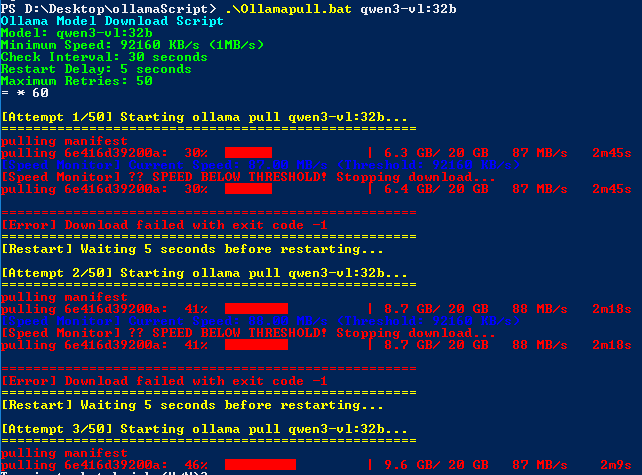 能够在完成后,自动终止脚本: 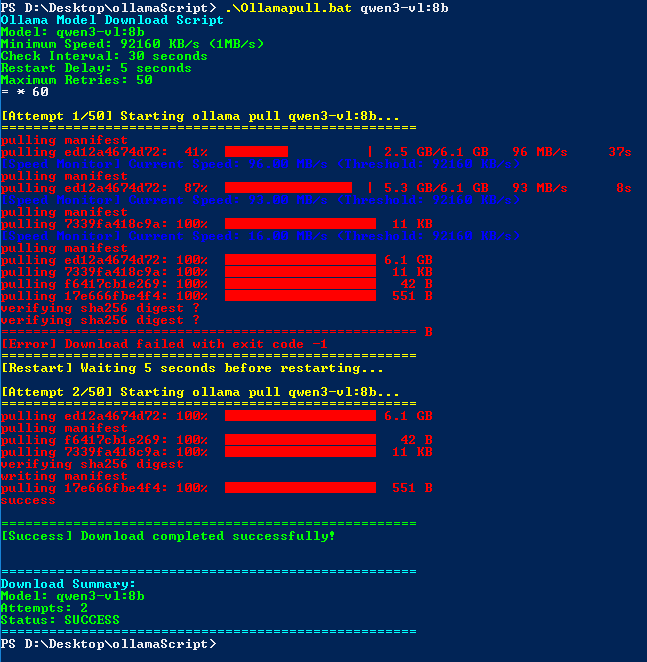 [【附件】OllamaPull.zip](/media/attachment/2026/01/OllamaPull.zip) # 问题 开始一直忽略了一个问题,ollama pull时,脚本会被阻塞,导致无法实时检测到下载速度,因而脚本改来改去,最终发现是阻塞导致无法检测,才最终将脚本完善。 编辑:myhappyandy
虚拟世界
2026年1月17日 10:49
转发文档
收藏文档
上一篇
下一篇
手机扫码
复制链接
手机扫一扫转发分享
复制链接
Markdown文件
分享
链接
类型
密码
更新密码